

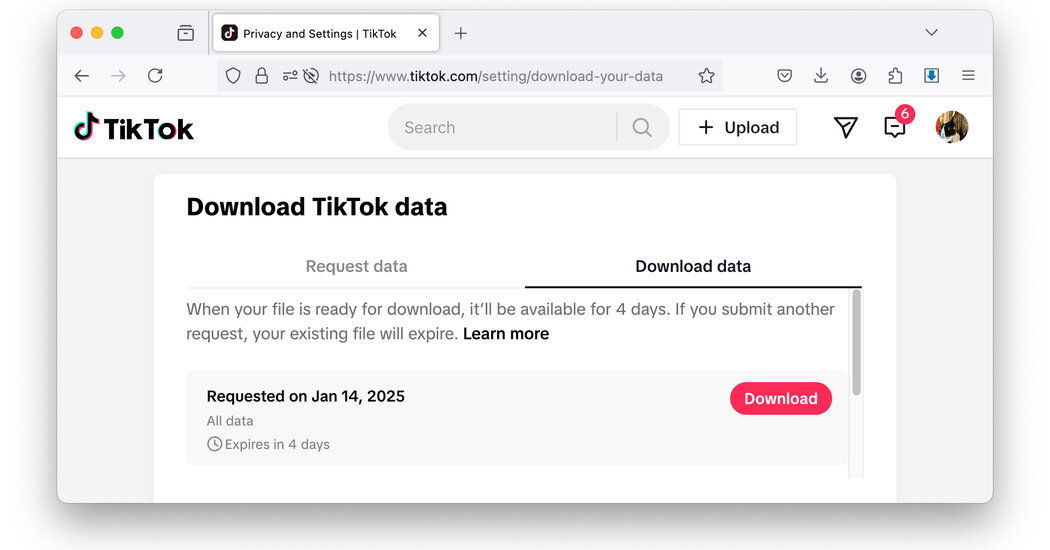
Feeling the sudden need to save your TikTok videos in case the site abruptly goes away? Here are a few methods for nontechnical users who want copies of the videos they personally uploaded or made on TikTok. You can also download a copy of your TikTok data right from your account, which doesn’t get you the video files themselves but will give other items including your direct messages and followers list.
Here’s how.
Download Individual Videos
If you just want to save a few favorite videos you made on the fly, snagging them one by one is fairly straightforward. To download a video on an Android or iPhone, go to your TikTok profile page, select a clip, tap the three-dot menu icon on the right side of the screen and tap Save Video. You can then email it to yourself, upload it to Google Drive (or another cloud service) or save it to your phone’s Files app or designated downloads area. Repeat as needed until you have all the videos you want.
You can also download videos on a computer by logging into your account on the TikTok site and right-clicking on a video. You should see a pop-up menu with the Download Video option. Note that when you download directly from the web browser, the clips typically have the TikTok watermark embedded.
If you don’t see a download option in the menu or have trouble saving a video, make sure the video or your account is set to public, not private.
Download All Your Videos
YouTube and other sites (including TikTok itself) are full of instructional videos on how to download all your TikTok clips at once using various third-party apps, websites and techniques of varying technical sophistication. But keep in mind that third-party apps can differ in security and reliability — and some bulk-downloading software may violate TikTok’s terms of service. Additionally, certain audio soundtracks are copyrighted and can’t be uploaded elsewhere.
But if you’re just trying to quickly get archival copies of your personal videos from your account, one solution is to use a computer browser extension designed to download all the videos on a page without watermarks. Using Google Chrome, for example, search the Chrome Web Store for TikTok Downloader; there are many extensions with descriptions and reviews. Install the one you like best and read its instructions. (TikTok Video Keeper was used in this example.)
Once you install the browser extension and return to your TikTok profile page, click the Download All button to deposit copies of your clips on your computer. Some extensions also give you a download button on individual videos if you have problems with downloading everything at once.
Download Your Data
Like other social media sites, TikTok allows you to download information about your account to your phone or computer. This data dump includes your activity on the site (browsing history, comments, your followers list and more), your direct messages and a text file of your posts with links to the videos.
To request your account data, open the TikTok app, go to your profile page and tap the three-lined menu icon in the upper-right corner. On the menu, select Settings and Privacy and on the next screen, select Account. Then choose Download Your Data from the menu. (If you prefer to do this on the TikTok website with a computer browser, click your profile icon in the upper-right corner, choose Settings and in the Privacy menu under Data, click Download Your Data.)
On the Download TikTok Data screen, choose All Data or tap Custom to request just certain files, like the direct messages you sent and received. Choose a file format, either plain text (the default choice and easier for nontechnical users) or JSON (JavaScript Object Notation), a standard that other social media sites can import. Once you have made your selections, tap the Request Data button.
Depending on your account, getting the files can take anywhere from a few minutes to a few days. When your files are ready, you get a notification from TikTok and a Download button appears in the Download Data tab. Click it to retrieve your files, which are compressed in a folder labeled TikTok that lands in whichever place you use for downloads, like your phone’s Files app or your computer’s Downloads folder.
If you chose the default text format, you should see a series of nested folders once you open the downloaded TikTok folder. Open the folders and then open a document to see your messages. The Posts.txt file has a list of all your videos posted to TikTok. You can paste the link to each video into your web browser and download the video from there.
TikTok’s situation may be more unstable than other social-media sites, but it can also serve as a reminder to keep backup copies of the things you share on any site as you go — so you don’t risk losing your creations if something unexpected happens.
