
Close Menu
    National News Brief
    Monday, November 23
    • Home
    • Business
    • Lifestyle
    • Science
    • Technology
    • International
    • Arts & Entertainment
    • Sports
    National News Brief
    Home » Stop your browser from killing your laptop battery with these 3 tweaks

    Stop your browser from killing your laptop battery with these 3 tweaks

    Team_NationalNewsBriefBy Team_NationalNewsBriefNovember 23, 2026 Business No Comments2 Mins Read
    Share
    Facebook Twitter LinkedIn Pinterest Email


    You unplug your laptop with a full charge, sit down at a coffee shop to get some work done, and an hour later your battery is already at 50%. You check your system settings to see what’s killing your power, and the culprit is exactly what you suspected: your web browser.

    Modern websites are effectively heavy software applications running constantly in the background. If you keep dozens of tabs open, your browser is caching media, running ad scripts, and refreshing data for every single one of them simultaneously. It eats up your system memory and forces your processor to work overtime.

    You don’t have to change the way you work or close your research tabs to get your battery life back. You just need to flip a few switches hidden in your browser’s settings menu.

    Turn on native memory savers

    Both Chrome and Edge finally have built-in tools to stop background tabs from draining power. In Chrome, go to Settings, click Performance and turn on Memory Saver and choose the Maximum option.

    In Edge, go to Settings, click System and Performance > Performance, and turn on Enable Energy Saver, then set it to Maximum Savings.

    Then toggle Automatically Put Tabs to Sleep on. This setting automatically puts inactive tabs to sleep until you click back to them.
    Stop background apps from running when closed

    By default, browsers like to keep their background processes running even after you’ve closed the browser window entirely. This is terrible for your battery.

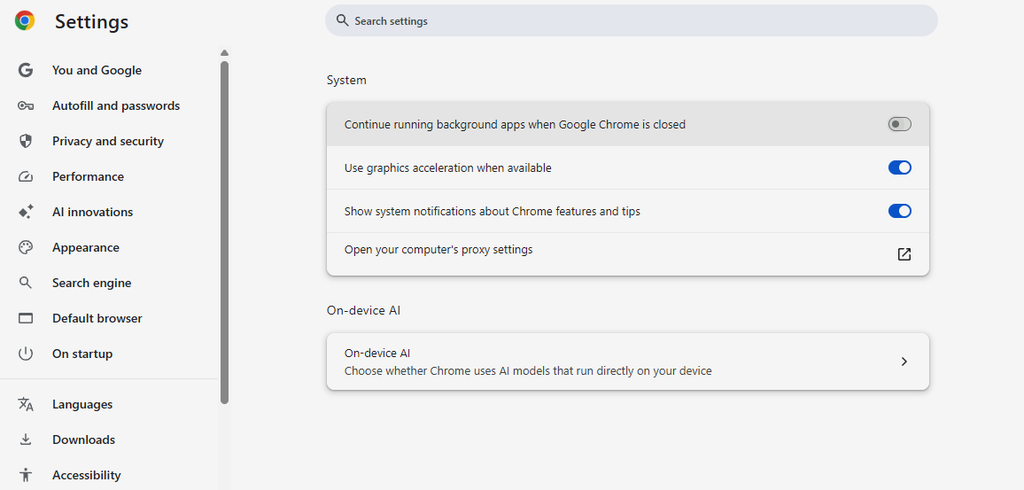
    Go to Chrome’s Settings, click System, and toggle off the switch that says “Continue running background apps when Google Chrome is closed.”

    In Edge, go to System and Performance > System and toggle off “Continue running background extensions and apps when Edge is closed.”
    Use a tab discarding extension

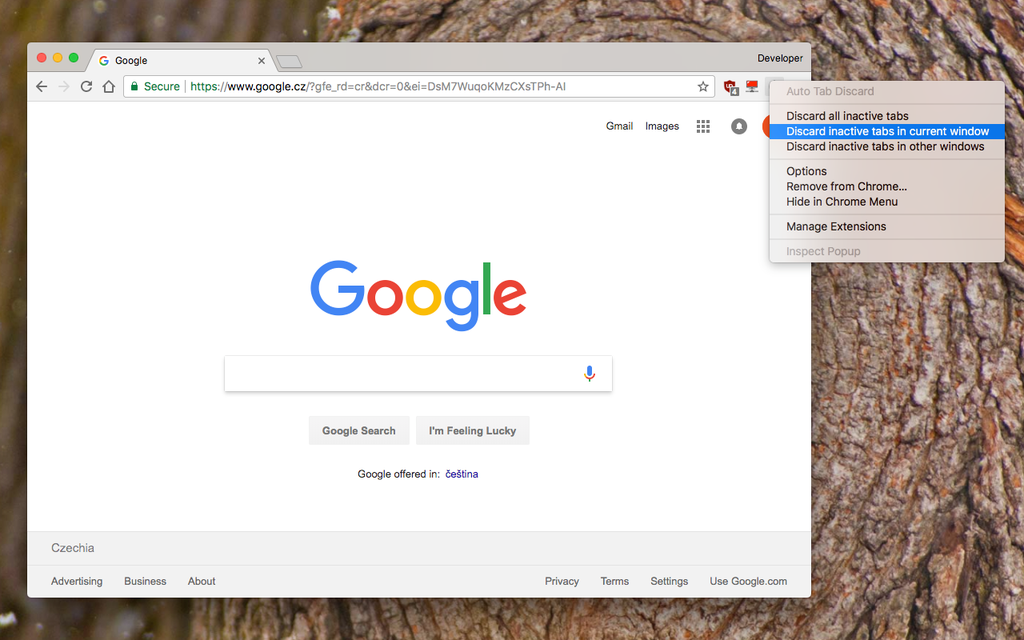
    If you’re someone who keeps fifty tabs open at all times, native memory savers might not be aggressive enough. Install a free extension such as Auto Tab Discard.

    It lets you set strict rules, like automatically unloading any tab you haven’t looked at in 10 minutes. The tab stays visible in your top bar, but it uses absolutely zero battery power until you click it again.


    Source link

    Team_NationalNewsBrief
    • Website

    Keep Reading

    Your Team Gets More Done With AI. So Why Do They Burn Out?

    Wendy’s store closures hit close to 100 locations in franchisee downfall: See the latest list

    Your Business Is Busy. But Is It Actually Growing?

    The 5 Little Habits That Made a Bigger Difference in My Business Than I Expected

    Win Customers Over This Holiday Season With Human Connection

    This Is the Reason Your AI Actually Remembers Anything

    Add A Comment

    Comments are closed.

    Editors Picks

    Living material made from fungus could make buildings more sustainable

    April 21, 2025

    Deadly fungus makes sick frogs jump far, possibly to find mates

    November 27, 2025

    How Taylor Swift is turning the NFL’s mass-media machine into a a pipeline for new male fans

    December 13, 2025

    The ‘Active 3 TD-catch NFL games’ quiz

    May 8, 2026

    Opinion | This Is the Democrats’ Biggest Problem

    March 13, 2026
    Categories
    • Arts & Entertainment
    • Business
    • International
    • Latest News
    • Lifestyle
    • Opinions
    • Politics
    • Science
    • Sports
    • Technology
    • Top Stories
    • Trending News
    • World Economy
    About us

    Welcome to National News Brief, your one-stop destination for staying informed on the latest developments from around the globe. Our mission is to provide readers with up-to-the-minute coverage across a wide range of topics, ensuring you never miss out on the stories that matter most.

    At National News Brief, we cover World News, delivering accurate and insightful reports on global events and issues shaping the future. Our Tech News section keeps you informed about cutting-edge technologies, trends in AI, and innovations transforming industries. Stay ahead of the curve with updates on the World Economy, including financial markets, economic policies, and international trade.

    Editors Picks

    The EU Has Adopted The Tactics Of Stalin – Fear Free Speech

    November 23, 2026

    Nikola Jokic Notches Monster Triple-Double for Nuggets

    November 23, 2026

    Adam Driver Still Has ‘Heartbreak’ Over Scrapped ‘Star Wars’ Movie

    November 23, 2026

    Alice Huang in touch with Chinese spy agency during affair with Nvidia CEO: Report

    November 23, 2026
    Categories
    • Arts & Entertainment
    • Business
    • International
    • Latest News
    • Lifestyle
    • Opinions
    • Politics
    • Science
    • Sports
    • Technology
    • Top Stories
    • Trending News
    • World Economy
    • Privacy Policy
    • Disclaimer
    • Terms and Conditions
    • About us
    • Contact us
    Copyright © 2024 Nationalnewsbrief.com All Rights Reserved.

    Type above and press Enter to search. Press Esc to cancel.