
Close Menu
    National News Brief
    Wednesday, September 23
    • Home
    • Business
    • Lifestyle
    • Science
    • Technology
    • International
    • Arts & Entertainment
    • Sports
    National News Brief
    Home » Transform Chrome’s new tab page into the ultimate bookmark launchpad

    Transform Chrome’s new tab page into the ultimate bookmark launchpad

    Team_NationalNewsBriefBy Team_NationalNewsBriefSeptember 21, 2026 Business No Comments4 Mins Read
    Share
    Facebook Twitter LinkedIn Pinterest Email


    Whenever I install a new web browser, one of the first things I do is replace the new tab page.

    Depending on which browser you use, the default home page could be cluttered with news headlines, promotional tiles, or a messy list of recently visited sites. Typically, though, I already know which page I want to visit, and everything else becomes a distraction.

    So instead of sticking with the default, I use an alternative that focuses entirely on bookmarks, presenting dozens of links in the tidiest way possible.

    This tip originally appeared in the free Cool Tools newsletter from The Intelligence. Get the next issue in your inbox and get ready to discover all sorts of awesome tech treasures!

    Nothing but ’net links

    For a better new tab page full of your favorite bookmarks, check out A Fine Start.

    ➜ A Fine Start is a web browser extension that replaces your default new tab page with a simple, organized list of links.

    ⌚ Installing the extension takes just a minute. Setting up your links takes a few minutes longer.

    ✅ A Fine Start’s extension works in almost any desktop web browser. There’s also a non-installable web page version, which you can set as your homepage in Safari and some mobile browsers.

    A Fine Start is simple and minimalist—and it works almost anywhere.

    After installing the extension, use the “Add” button at the top to start adding links to the page. Give each link a name, and consider adding it to a “Group,” which creates a bit of visual separation between different kinds of bookmarks.
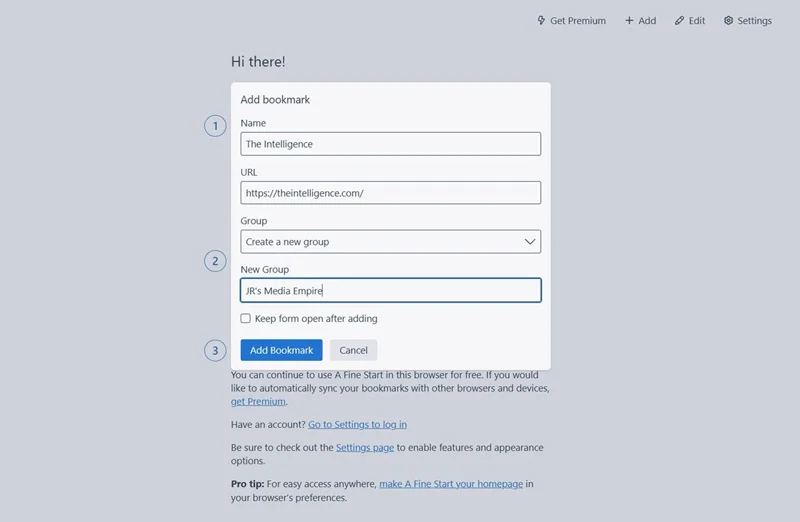
    Adding a new bookmark is as easy as can be.

    Once you’ve added a bunch of bookmarks, you may want to reposition them. Just click the “Edit” button, then drag and drop individual bookmarks or an entire group. You can move items into separate columns to further distinguish different categories of bookmarks.
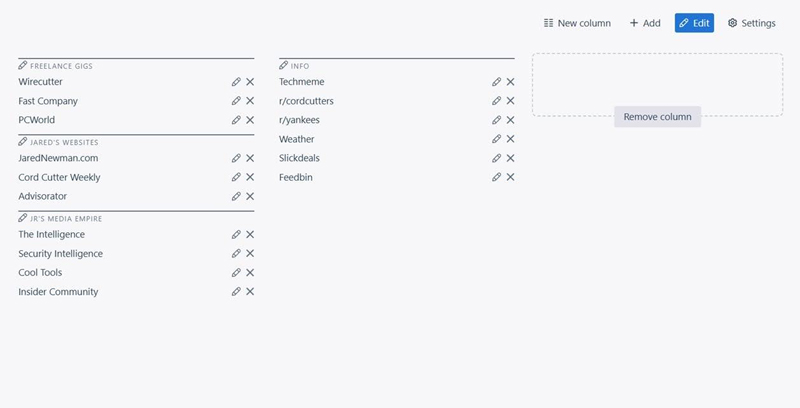
    You can move and reposition items for any arrangement imaginable.

    A Fine Start’s Settings menu is also worth a look. From here you can add a search button, a bulk open setting, an option to expand or collapse your groups, and a “privacy toggle” that hides all your bookmarks (for instance, while screen-sharing). You can customize color themes and buttons in this menu as well.
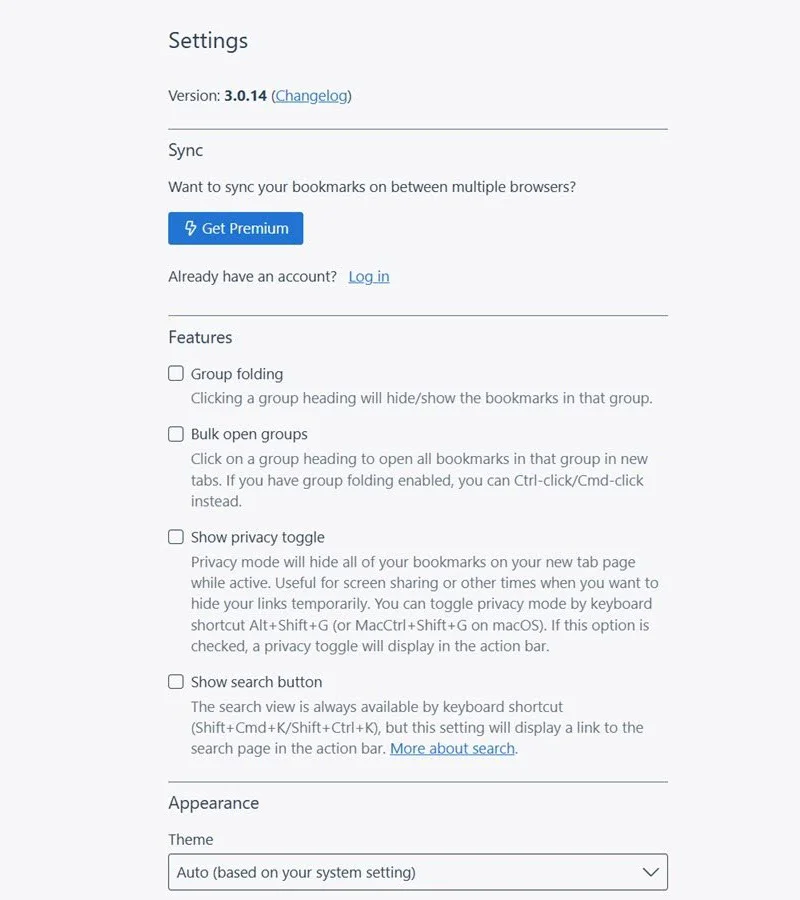
    A Fine Start’s settings screen holds some interesting surprises.

    You should also take note of the Import/Export option in settings. While A Fine Start has a $5-per-month premium option that automatically syncs bookmarks between devices, you can also just manually export the code, and then import it on a new device or browser. Once your bookmarks are all set up, consider keeping your export in a note or file somewhere so it’s easily available for importing later.
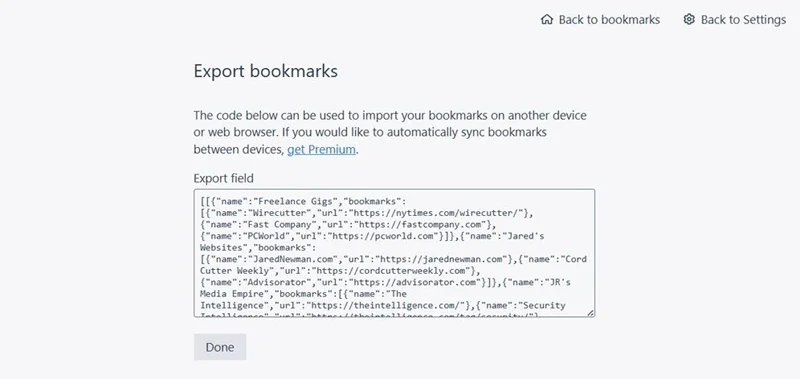
    Exporting your custom homepage setup is easy—and free.

    A Fine Start isn’t alone in providing a simpler, bookmark-driven new tab page, but I appreciate its easy setup, clean presentation, and lack of overwhelming customization options. It also emphasizes privacy, as your bookmarks only are stored on-device unless you pay for the optional sync service.

    Best of all, it works in any browser, so you can switch from Chrome to Firefox to Vivaldi to Brave to Opera to Helium to Safari (and so on), and easily keep the same list of bookmarks handy. That’s the whole point of having them, isn’t it?

    • A Fine Start is available as an extension on Chrome, Firefox, and Chromium-based browsers, and as a bookmarkable web page in other browsers like Safari.
    • The site is free to use with no bookmark limits or access restrictions. An optional $5-per-month subscription syncs bookmarks across devices, but manual importing and exporting is free.
    • A Fine Start uses your browser’s local storage to save bookmarks and other data, so the developer does not have access to them. No sign-up is necessary unless you pay for the sync service.

    Treat yourself to all sorts of brain-boosting goodies like this with the free Cool Tools newsletter—starting with an instant introduction to an incredible audio app that’ll tune up your days in truly delightful ways.


    Source link

    Team_NationalNewsBrief
    • Website

    Keep Reading

    Take the Road Less Traveled — It May Bring You the Most Success

    Why Your Virtual Event Flopped — and 7 Ways to Make It Better

    How to Tell If Your Products Are Invisible to ChatGPT

    Gen Z Hits Wealth Milestone Average Boomer Didn’t Until Age 32

    How Domino’s Pizza Tracker Reshaped Nearly Every App You Use

    The Leadership Skill I Rely on Most When Times Get Tough

    Add A Comment

    Comments are closed.

    Editors Picks

    Jennifer Garner Given ‘Ultimatum’ By Boyfriend After Hug With Ben Affleck

    March 12, 2025

    Gene Simmons’ Crash Sends Hollywood Into Legal Overdrive

    October 21, 2025

    Actress Catherine O’Hara dies at age 71

    January 30, 2026

    What are World Cup 2026 national team base camps and their locations? | World Cup 2026

    May 16, 2026

    Proud Father and Former J6 Hostage Billy Chrestman Fights to Have Shared Custody of His Daughter | The Gateway Pundit

    February 20, 2025
    Categories
    • Arts & Entertainment
    • Business
    • International
    • Latest News
    • Lifestyle
    • Opinions
    • Politics
    • Science
    • Sports
    • Technology
    • Top Stories
    • Trending News
    • World Economy
    About us

    Welcome to National News Brief, your one-stop destination for staying informed on the latest developments from around the globe. Our mission is to provide readers with up-to-the-minute coverage across a wide range of topics, ensuring you never miss out on the stories that matter most.

    At National News Brief, we cover World News, delivering accurate and insightful reports on global events and issues shaping the future. Our Tech News section keeps you informed about cutting-edge technologies, trends in AI, and innovations transforming industries. Stay ahead of the curve with updates on the World Economy, including financial markets, economic policies, and international trade.

    Editors Picks

    Pornhub age checks investigated by Ofcom

    September 23, 2026

    The Houthis Have Saudi Arabia Trapped Between Two Chokepoints

    September 23, 2026

    Dell, Roiv, Shel Hit 52-Week Highs

    September 23, 2026

    Prince William Criticized Over Tom Cruise’s Kate Middleton Gesture

    September 23, 2026
    Categories
    • Arts & Entertainment
    • Business
    • International
    • Latest News
    • Lifestyle
    • Opinions
    • Politics
    • Science
    • Sports
    • Technology
    • Top Stories
    • Trending News
    • World Economy
    • Privacy Policy
    • Disclaimer
    • Terms and Conditions
    • About us
    • Contact us
    Copyright © 2024 Nationalnewsbrief.com All Rights Reserved.

    Type above and press Enter to search. Press Esc to cancel.