
Close Menu
    National News Brief
    Saturday, August 8
    • Home
    • Business
    • Lifestyle
    • Science
    • Technology
    • International
    • Arts & Entertainment
    • Sports
    National News Brief
    Home » How to put all your incoming messages in one unified dashboard (it’s easy!)

    How to put all your incoming messages in one unified dashboard (it’s easy!)

    Team_NationalNewsBriefBy Team_NationalNewsBriefJuly 27, 2026 Business No Comments3 Mins Read
    Share
    Facebook Twitter LinkedIn Pinterest Email

    If your workday feels like a high-stakes game of notification whack-a-mole, you aren’t alone. Between Slack channels buzzing, Microsoft Teams pinging in the background, multiple email accounts open, and mobile messages cluttering your phone, simply checking if someone needs you takes up half your morning.

    You don’t need more communication tools! You need a single, unified dashboard that aggregates all those incoming messages into one central cockpit and then gives you complete control over when you actually see them.

    Here’s how to build one in about 20 minutes.

    The strategy: Use a catch-all app

    The cleanest, most reliable approach for most people is the aggregator app method. Rather than messing with complex webhooks or custom scripts, you wrap all your web-based messaging apps into a single desktop window with strict notification filters.

    Setting up your unified dashboard

    1.Prune your active channels

    Before pulling everything into one place, declare notification bankruptcy on channels you don’t actually need in real-time. Turn off “channel joined” alerts in Slack, mute low-priority Teams channels, and unsubscribe from non-essential email lists. If a channel doesn’t require direct action from you today, it shouldn’t be triggering real-time alerts.

    2.Choose and install a dedicated workspace app

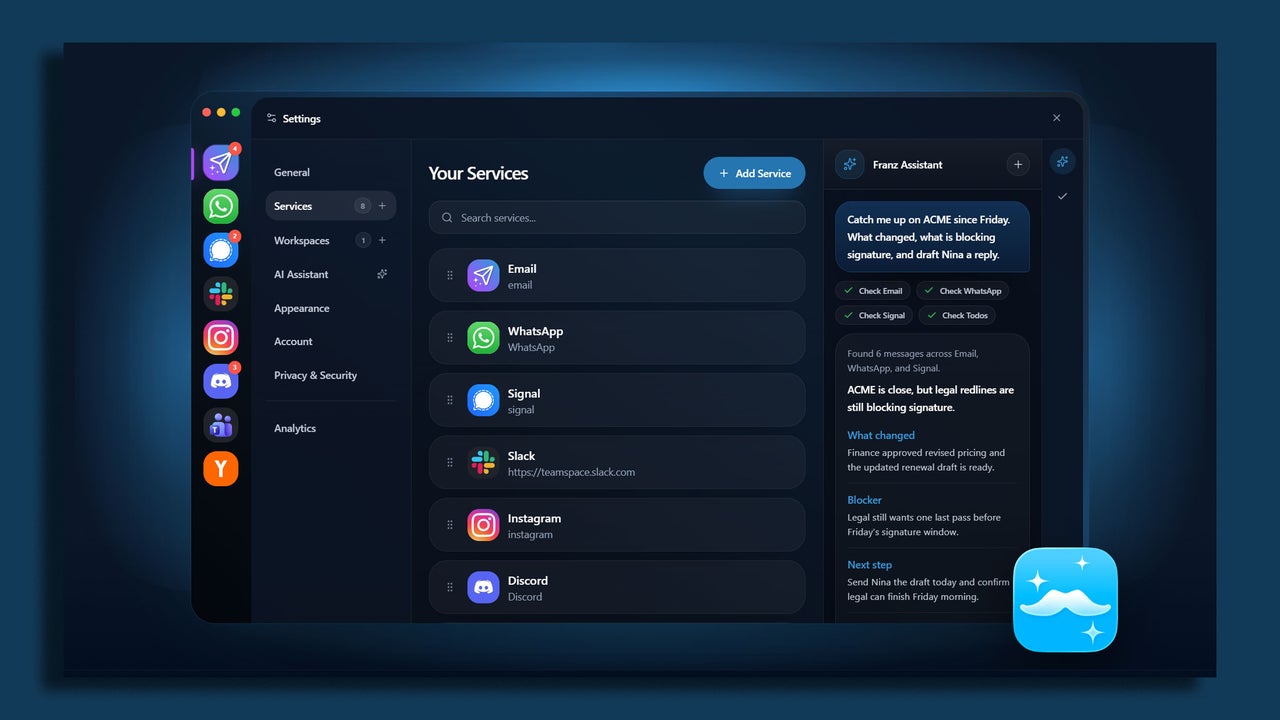
    Download a specialized workspace aggregator like Rambox, Franz, or Shift. All three have free versions with enough features to get you started.

    These apps let you run communication apps inside a standalone, organized window. Instead of keeping eight browser tabs open that hog system memory, you get one clean interface with dedicated app profiles.

    3.Consolidate SMS and mobile messaging

    If SMS or mobile-first apps like Signal and WhatsApp are part of your work day, pair them to your desktop setup. Mac users can leverage native Messages syncing, while Windows users can hook up Google Messages for Web or Phone Link. Add these web endpoints right into your workspace app alongside your work chat apps.

    4.Kill badge counts and set unified focus hours

    I know it sounds blasphemous, but turn off all red unread badge counters inside your aggregator app. Badges are designed to trigger panic!

    Instead, configure custom notification schedules within your workspace app so alerts only land during designated check-in windows (for example, at 10am and 3pm).

    Optional: Create a “VIP-only” emergency fail-safe

    The biggest fear people have when consolidating messages is missing a genuine emergency. The fix isn’t keeping every app open on a secondary monitor, it’s creating a dedicated emergency bypass.

    Set up a specific keyword alert in Slack and Teams (like your name or “URGENT”) to trigger sound alerts, while muting all general channel activity.

    For email, create a simple rule that pushes desktop pop-up notifications only if the message comes from your direct manager or key clients.


    Source link

    Team_NationalNewsBrief
    • Website

    Keep Reading

    His Franchise Platform Has Surpassed $1 Billion in Sales

    7 Things That Happen After Someone Clicks Your Ad (and Why the Real Story Starts There)

    The Real Product Isn’t What You Sell. It’s What Comes After.

    Business Helping Employees See Hazards Makes Millions: COVE

    The 70/20/10 Rule That Keeps Your Marketing Budget From Going Stale

    How Google Is Rewriting Search — and What Entrepreneurs Must Do Before Their Competitors Do

    Add A Comment

    Comments are closed.

    Editors Picks

    Pixar’s RenderMan Art Challenge Highlights IEEE’s Roots

    July 10, 2025

    Opinion | Trump Is an Angry Little Boy on a Great White Horse

    March 7, 2025

    Supermassive dark matter stars may be lurking in the early universe

    November 28, 2025

    Mass shooting in Towson, Maryland leaves 1 dead and 9 injured

    December 18, 2024

    Connecticut Town Trials Four-Day Workweek, Employees Love It

    October 9, 2024
    Categories
    • Arts & Entertainment
    • Business
    • International
    • Latest News
    • Lifestyle
    • Opinions
    • Politics
    • Science
    • Sports
    • Technology
    • Top Stories
    • Trending News
    • World Economy
    About us

    Welcome to National News Brief, your one-stop destination for staying informed on the latest developments from around the globe. Our mission is to provide readers with up-to-the-minute coverage across a wide range of topics, ensuring you never miss out on the stories that matter most.

    At National News Brief, we cover World News, delivering accurate and insightful reports on global events and issues shaping the future. Our Tech News section keeps you informed about cutting-edge technologies, trends in AI, and innovations transforming industries. Stay ahead of the curve with updates on the World Economy, including financial markets, economic policies, and international trade.

    Editors Picks

    Netanyahu’s Scorched Earth Tactics | Armstrong Economics

    August 8, 2026

    “I’m Transgender. I’m a Woman” – Another Former NBA Player Announces Plans to Enter Next WNBA Draft (VIDEO)

    August 8, 2026

    Britney Spears Laments Having ‘Failed’ Sons, Exposes Parents

    August 8, 2026

    The rise of fashion slop: How algorithms are now shaping what we wear

    August 8, 2026
    Categories
    • Arts & Entertainment
    • Business
    • International
    • Latest News
    • Lifestyle
    • Opinions
    • Politics
    • Science
    • Sports
    • Technology
    • Top Stories
    • Trending News
    • World Economy
    • Privacy Policy
    • Disclaimer
    • Terms and Conditions
    • About us
    • Contact us
    Copyright © 2024 Nationalnewsbrief.com All Rights Reserved.

    Type above and press Enter to search. Press Esc to cancel.